Why Should You Read This?🔗
When I first learned about IP addresses, this blew my mind: my laptop had IP address 192.168.1.100, but when websites saw me, I appeared as 203.0.113.45. Two completely different addresses for the same device.
This wasn’t a bug - it’s by design. The internet operates with two parallel addressing systems: public IPs (globally routable) and private IPs (locally significant). Understanding this split is fundamental to:
- Setting up any network
- Understanding why some devices can’t be reached from the internet
- Configuring firewalls and port forwarding
- Troubleshooting connectivity issues
- Designing secure network architectures
By the end of this, you’ll understand why this dual system exists, how NAT (Network Address Translation) bridges these worlds, and how to leverage this for security and scalability.
What Problem Does This Solve?🔗
Imagine you’re designing a postal system for the entire world. You have two challenges:
- Finite address space: You can only create so many unique addresses before you run out
- Privacy concerns: Do you really want everyone worldwide to know the exact layout of every house inside every building?
The solution? A two-tier system:
- Public addresses: Buildings get unique street addresses for external mail
- Internal addressing: Inside each building, apartments use simple numbers (1A, 2B, 3C) that only matter internally
Multiple buildings can use the same internal numbering (every building has an apartment 1A), but each building has a unique external address.
This is exactly how the internet works.
The IPv4 Exhaustion Crisis🔗
In the early days of the internet (1980s), IPv4 seemed infinite:
IPv4 addresses: 2^32 = 4,294,967,296 (about 4.3 billion)
World population: ~4.5 billion
“One IP per person should be enough,” they thought.
They were spectacularly wrong.
Today, each person has multiple devices:
- Smartphone
- Laptop
- Tablet
- Smart TV
- IoT devices (cameras, thermostats, lights)
- Work computer
- Gaming console
Plus servers, routers, infrastructure devices… We’d need 50+ billion addresses. IPv4 can’t handle that.
The solution? Private IP addresses with NAT.
Private IP Address Ranges: The Reserved Blocks🔗
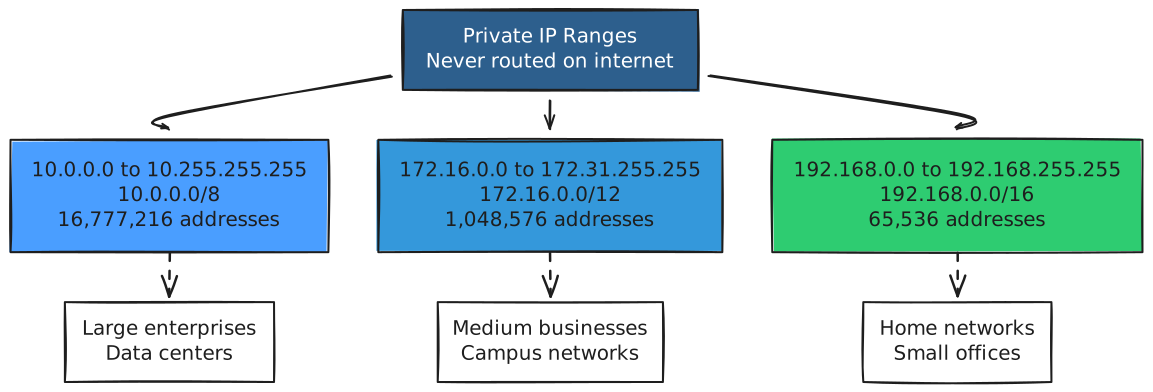
The Internet Assigned Numbers Authority (IANA) reserved specific IP ranges for private use. These addresses are never routed on the public internet.
New to IP addresses? Check out my detailed guide: IP Addresses: The Internet’s Addressing System
The Three Private Ranges🔗
Why These Specific Ranges?🔗
These ranges were chosen from the original Class A, B, and C address space and set aside by RFC 1918 in 1996.
Critical rule: If you see an IP in these ranges, it’s private. Internet routers will drop packets destined for these addresses because they’re not unique globally.
Most Common: 192.168.x.x🔗
Your home router almost certainly uses:
Router: 192.168.1.1 or 192.168.0.1
Devices: 192.168.1.2-254 (or .0.2-254)
Why? It’s the default for consumer routers from Linksys, Netgear, TP-Link, etc.
Corporate Networks Often Use 10.x.x.x🔗
Large companies prefer the 10.0.0.0/8 range because it offers the most flexibility:
Office 1: 10.1.0.0/16 (65,534 hosts)
Office 2: 10.2.0.0/16
Office 3: 10.3.0.0/16
...
Public IP Addresses: Globally Unique🔗
A public IP address is globally unique and routable on the internet. Think of it as your “real” address on the internet.
How Public IPs Are Allocated🔗
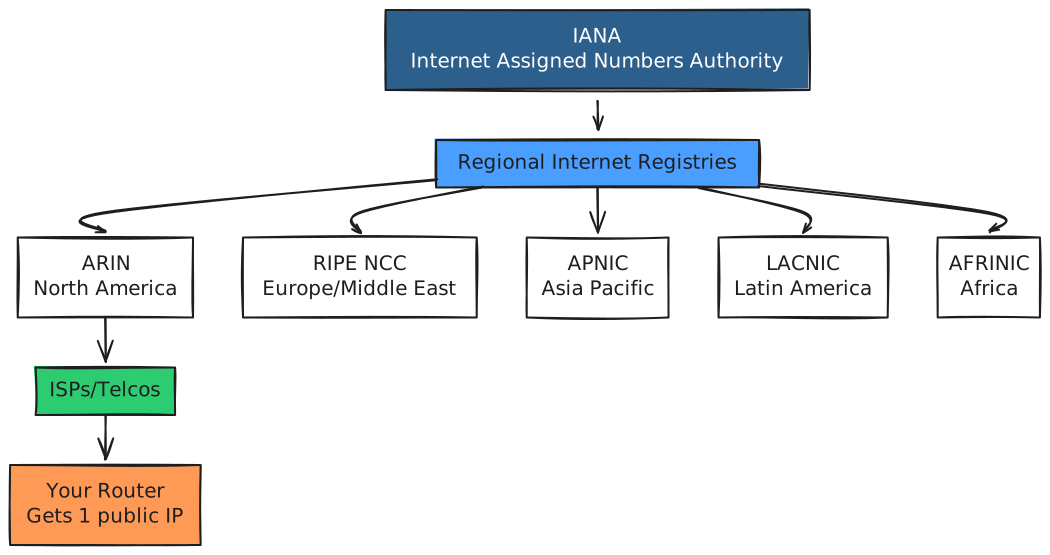
When you sign up for internet service:
- Your ISP assigns you one public IP (usually dynamically)
- Your router gets this IP on its WAN (internet-facing) interface
- Your router uses NAT to share this IP with all internal devices
Static vs Dynamic Public IPs🔗
Dynamic (most common):
- ISP assigns you an IP from a pool
- Changes periodically (when you reboot router, or on a schedule)
- Cheaper (often free with residential service)
- Problem: Can’t reliably host services (IP changes)
Static (costs extra):
- You get a permanent public IP
- Never changes
- Essential for hosting servers, VPNs, or services
- Businesses usually need this
NAT: The Bridge Between Public and Private🔗
NAT (Network Address Translation) is the magic that lets dozens of devices with private IPs share one public IP.
How NAT Works🔗
Your router maintains a translation table that maps internal devices to the external IP:
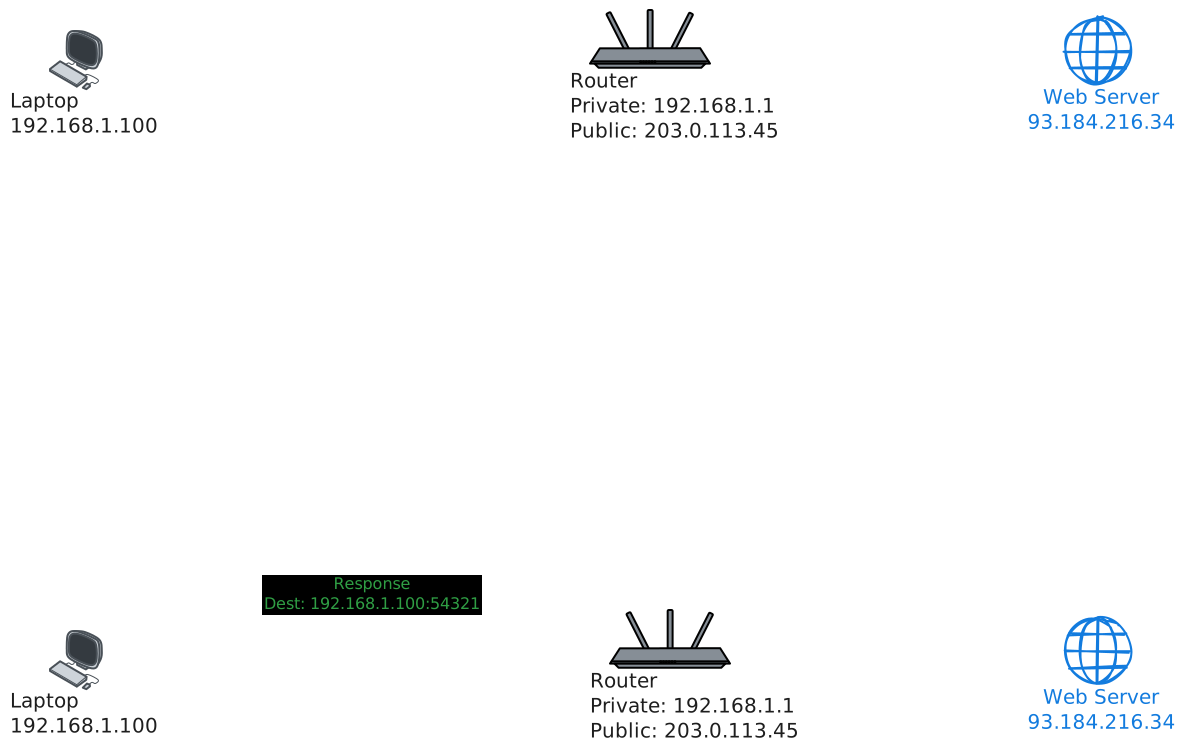
What happens:
- Your laptop (192.168.1.100) requests a website
- Router replaces source IP with its public IP and tracks the connection
- Response comes back to router’s public IP
- Router looks up which internal device made the request
- Router forwards response to your laptop
The NAT Translation Table🔗
Inside the router, a table tracks active connections:
| Internal IP:Port | External IP:Port | Destination | State |
|---|---|---|---|
| 192.168.1.100:54321 | 203.0.113.45:60000 | 93.184.216.34:80 | ESTABLISHED |
| 192.168.1.101:34567 | 203.0.113.45:60001 | 1.2.3.4:443 | ESTABLISHED |
| 192.168.1.100:54322 | 203.0.113.45:60002 | 8.8.8.8:53 | TIME_WAIT |
This is why multiple devices can browse the internet simultaneously through one public IP.
Types of NAT🔗
1. Static NAT (One-to-One)
Permanently maps one private IP to one public IP:
Private: 192.168.1.50 ←→ Public: 203.0.113.46
Used for servers that need consistent external addressing.
2. Dynamic NAT (Pool)
Maps private IPs to a pool of public IPs on demand:
Private range: 192.168.1.0/24
Public pool: 203.0.113.45-50 (6 addresses)
First-come, first-served from the pool.
3. PAT (Port Address Translation) / NAT Overload
What your home router uses - many private IPs share one public IP using different ports.
All devices → 203.0.113.45 (using different source ports)
This is the most common and efficient form.
Network Architecture: The Complete Picture🔗
Here’s how a typical home or small office network is structured:
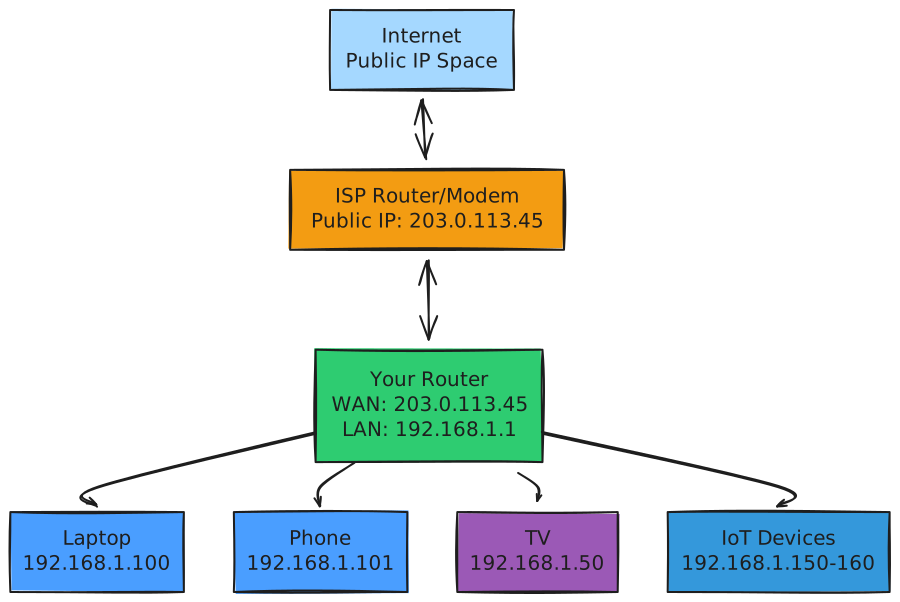
Two separate address spaces:
Outside (WAN) - Public:
Your router's public interface: 203.0.113.45
Web servers see this IP
Inside (LAN) - Private:
Your router's private interface: 192.168.1.1
Devices: 192.168.1.x
Devices only see this network
Security Implications: The Hidden Benefits🔗
This public/private split isn’t just about address conservation - it’s a massive security advantage.
Natural Firewall Effect🔗
Devices with private IPs are unreachable from the internet by default. NAT creates an implicit firewall:
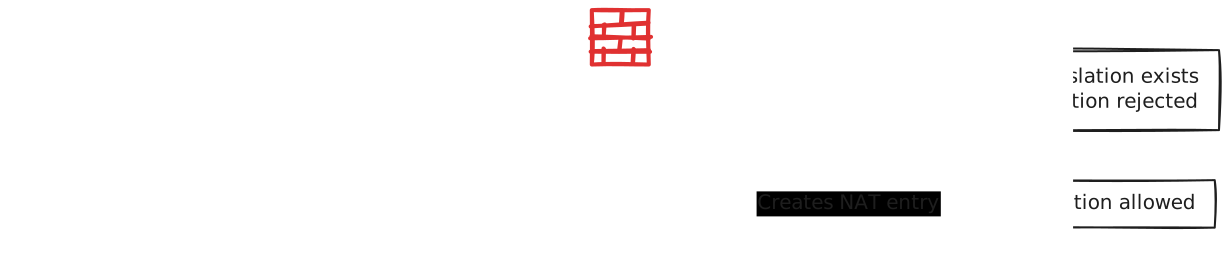
Why it’s secure:
- Inbound connections blocked: Random internet users can’t reach your devices
- Stateful tracking: Router only allows responses to connections you initiated
- Obscurity: Your internal network structure is hidden
Port Forwarding: Punching Holes in NAT🔗
Sometimes you want to accept inbound connections (for game servers, remote access).
Port forwarding creates a NAT rule:
External: 203.0.113.45:8080 → Internal: 192.168.1.50:8080
Anyone connecting to your public IP on port 8080 reaches your homeserver on port 8080.

Security warning: Port forwarding exposes your internal device to the internet. Make sure it’s secure (strong auth, firewall, updates).
DMZ: The Danger Zone🔗
Some routers offer a DMZ (Demilitarized Zone) option - forwarding all ports to one device.
Never use this unless you know what you’re doing. It’s essentially putting that device directly on the internet with zero protection.
Public vs Private: Comparison Table🔗
| Aspect | Public IP | Private IP |
|---|---|---|
| Routable on Internet | Yes | No (dropped by internet routers) |
| Globally Unique | Yes (expensive) | No (reused in every network) |
| Assigned By | ISP | Local DHCP server / manual config |
| Cost | Paid resource | Free (use as many as needed internally) |
| Changes Frequently | Sometimes (dynamic) | Rarely (DHCP leases) |
| Ranges | All IPs except reserved | 10.x.x.x, 172.16-31.x.x, 192.168.x.x |
| Reachable From | Anywhere on internet | Only local network |
| Security | Exposed (needs firewall) | Hidden behind NAT |
| Use Case | Public-facing servers | Internal devices |
IPv6: The Game Changer🔗
IPv6 (the next generation) changes everything:
IPv6 addresses: 2^128 = 340 undecillion (340 trillion trillion trillion)
That’s enough to give every atom on Earth billions of addresses.
No More NAT (Mostly)🔗
IPv6 was designed to eliminate the need for NAT. Every device can have a globally unique, routable IPv6 address.
Your laptop: 2001:0db8:85a3:0000:0000:8a2e:0370:7334
Still private: fe80::1 (link-local)
But privacy concerns remain: If every device has a permanent public address, you’re more trackable. IPv6 includes privacy extensions (temporary addresses) to mitigate this.
Reality: NAT isn’t going away soon. Many networks still use “NAT66” for security and control, even with IPv6.
Common Misconceptions🔗
“Private IPs are less secure”🔗
Wrong. Private IPs behind NAT are more secure by default than public IPs because they’re unreachable from the internet.
“I need a static public IP for everything”🔗
Nope. Most users are fine with dynamic IPs. Static IPs are only needed for hosting services that external people need to reach reliably.
“NAT breaks peer-to-peer applications”🔗
Partially true. NAT does complicate P2P (like gaming, VoIP, video calls) because inbound connections are blocked. Solutions exist (UPnP, STUN/TURN servers, hole-punching).
“All 192.168.x.x addresses are on my network”🔗
Wrong. Every home network uses 192.168.x.x. Your network is isolated from other networks using the same private range.
Try This Yourself🔗
Find Your Public IP🔗
# From command line
curl ifconfig.me

# Or visit in browser
https://ifconfig.me
https://icanhazip.com
Find Your Private IP🔗
Linux/macOS:
ip addr show    # Look for 192.168.x.x or 10.x.x.x
# or
ifconfig
Windows:
ipconfig
Understand the Difference🔗
# Your private IP (local)
ip addr show | grep "inet 192"

# Your public IP (what internet sees)
curl ifconfig.me

# Are they different? That's NAT in action.
Test Reachability🔗
# Try to ping your private IP from the internet
# (Spoiler: It won't work - private IPs aren't routed)

# Ask a friend on a different network:
ping 192.168.1.100
# Result: No route to host (or request timeout)
Key Takeaways🔗
- Private IPs are for internal networks - three ranges (10.x, 172.16-31.x, 192.168.x) reserved by RFC 1918
- Public IPs are globally unique - routable on the internet, assigned by ISPs
- NAT bridges the gap - allows many private IPs to share one public IP
- Security by default: Private IPs behind NAT are unreachable from the internet
- IPv4 scarcity: Private IPs + NAT solved IPv4 exhaustion
- Port forwarding: Selective exposure of internal services
- Two-tier addressing: Like buildings (public address) with apartments (private numbers)
- IPv6 changes this: Enough addresses for everything, but NAT persists for other reasons
The mental model: Think of your network like an office building. The building has one public street address (your router’s public IP), but inside, each office has a private suite number (192.168.1.x). Mail from outside goes to the building address, and the receptionist (NAT) routes it to the right suite. Suites can send mail out (appears to come from the building address), but outsiders can’t directly mail a specific suite without the receptionist’s help (port forwarding).
This architecture isn’t just clever engineering - it’s what makes the modern internet possible. Without private IPs and NAT, we would have run out of addresses decades ago, and every device would be directly exposed to internet attacks. The public/private split is both a practical solution and a security feature.