
When I first started working with networks, IP addresses felt like magic numbers that just “made things work.” But here’s the thing - every time you open a website, send an email, or stream a video, IP addresses are working behind the scenes to make sure your data gets to the right place.
Without understanding IP addresses, you’re essentially navigating the internet blind. You’ll struggle to:
- Troubleshoot network issues
- Set up servers
- Understand why certain devices can’t communicate
- Configure routers, firewalls, or VPNs
By the end of this, you’ll understand exactly what an IP address is, why it’s structured the way it is, and how it enables billions of devices to communicate.
What Problem Does This Solve?🔗
Imagine you’re sending a letter. You write it, seal it in an envelope, but then you realize - you don’t have an address. Where should the postal service deliver it? How do they know which house is yours among millions?
Before IP addresses, early networks faced exactly this problem. Computers could be connected by wires, but there was no standardized way to say “send this data to that specific computer.”
In the early days of networking, there were various addressing schemes, but they didn’t scale. As networks grew from connecting a few machines in a lab to connecting universities, then companies, and eventually the entire world, we needed a universal addressing system that could:
- Uniquely identify every device on a network
- Scale to billions of devices worldwide
- Work hierarchically so routers could make smart decisions
- Be human-readable enough for engineers to work with
This is why IP (Internet Protocol) addresses were created - they’re the internet’s postal system.
Core Concept: IP Addresses as Digital Street Addresses🔗
Think of an IP address like a street address for your device. Just as your home has a unique address that tells the postal service exactly where to deliver your mail, every device on a network needs a unique IP address so routers know where to send data.
When I first learned networking, I thought of it this way: if the internet is a massive city with billions of buildings (devices), an IP address is the exact address that lets delivery trucks (data packets) find the right building.
An IP address looks like this:
192.168.1.100
It’s four numbers, each between 0 and 255, separated by dots. We call these numbers octets (because each represents 8 bits in binary).
Why Four Numbers?🔗
This structure isn’t random. Each of those four numbers serves a purpose in the addressing hierarchy. Let me show you:
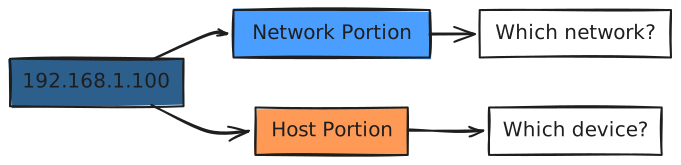
Plain English: The IP address is split into two logical parts - one identifies the network (like your neighborhood), and the other identifies the specific device (like your house number).
The Anatomy of an IP Address🔗
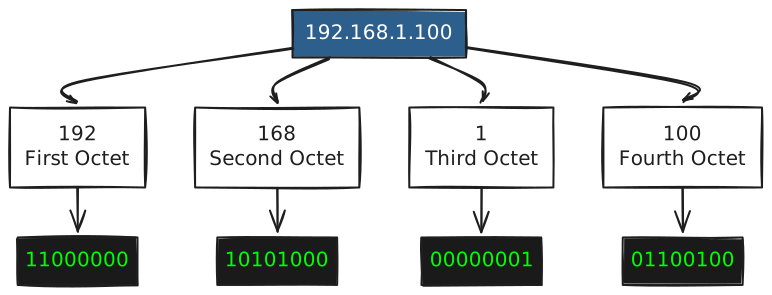
Let’s break down that example: 192.168.1.100
What’s an Octet?🔗
Each number is called an octet because it represents 8 bits in binary. Since each bit can be either 0 or 1, you have 2^8 = 256 possible values (0-255).
Here’s the key insight: computers don’t actually see “192.168.1.100” - they see:
11000000.10101000.00000001.01100100
That’s 32 bits total (4 octets × 8 bits each). We humans use the decimal notation because it’s easier to read and remember.
Why 255 is the Maximum🔗
Each octet is 8 bits. In binary, the maximum 8-bit value is:
11111111 (all bits set to 1)
In decimal, that’s: 128 + 64 + 32 + 16 + 8 + 4 + 2 + 1 = 255
The minimum is 00000000, which equals 0.
So each octet ranges from 0 to 255, giving us over 4 billion possible IPv4 addresses (256^4 = 4,294,967,296).
IP Address Classes: The Original Design🔗
When IP addresses were first designed in the 1980s, the internet was much smaller. Engineers created a class system to organize addresses efficiently.

Class A: For Massive Networks🔗
- Range: 0.0.0.0 to 127.255.255.255
- First bit: Always 0
- Use case: Huge organizations (like ISP)
- Networks: 128 possible networks
- Hosts per network: 16,777,214 devices
Think of Class A like giving someone an entire state - they have millions of “houses” (devices) they can address.
Class B: For Medium Networks🔗
- Range: 128.0.0.0 to 191.255.255.255
- First bits: Always 10
- Use case: Large companies and universities
- Networks: 16,384 possible networks
- Hosts per network: 65,534 devices
Class B is like giving someone a large city - still massive, but more manageable.
Class C: For Small Networks🔗
- Range: 192.0.0.0 to 223.255.255.255
- First bits: Always 110
- Use case: Small businesses, home networks
- Networks: 2,097,152 possible networks
- Hosts per network: 254 devices
This is like giving someone a neighborhood - perfect for most small networks.
Why Classes Matter (And Why They Don’t Anymore)🔗
Here’s the reality: classful addressing is mostly obsolete. Modern networks use CIDR (Classless Inter-Domain Routing) because the class system wasted too many addresses.
For example, if you needed 300 devices, you’d have to use a Class B address (65,000 hosts), wasting 64,700 addresses. That’s inefficient when we’re running out of IPv4 addresses.
But you’ll still see class terminology in older documentation.
Special IP Addresses You Should Know🔗
Not all IP addresses are created equal. Some have special meanings:
Loopback Address: 127.0.0.1🔗
This is your computer talking to itself. It’s like calling your own phone number.
ping 127.0.0.1
This always points to “localhost” - your own machine. Every device has this address for testing.
Private IP Ranges🔗
These addresses are reserved for internal networks and never appear on the public internet:
- 10.0.0.0 to 10.255.255.255 (Class A private)
- 172.16.0.0 to 172.31.255.255 (Class B private)
- 192.168.0.0 to 192.168.255.255 (Class C private)
Your home router typically assigns devices addresses like 192.168.1.x - that’s why you’ll never see those on the internet.
Broadcast Address🔗
The last address in a network (all host bits set to 1) is used to send data to all devices on that network.
For network 192.168.1.0/24, the broadcast address is 192.168.1.255.
Network vs Host: The Division🔗
Every IP address has two parts, but where’s the dividing line? This is where the subnet mask comes in (which it’s pretty deeper).
For now, just know:
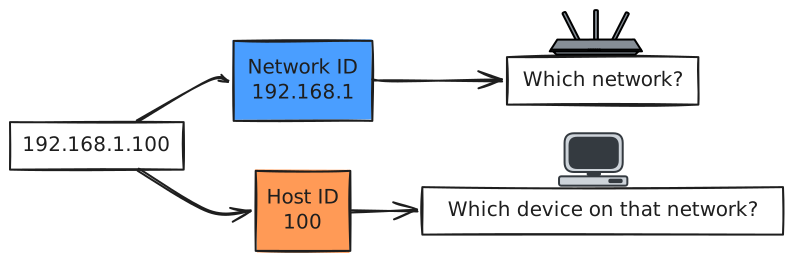
Think of it like a phone number:
- Area code = Network portion (which city?)
- Local number = Host portion (which person in that city?)
Binary Logic: How Routers See Addresses🔗
Here’s where it clicks for most people. Routers don’t see IP addresses the way we do. They see bits:
Human view:     192.168.1.100
Computer view:  11000000.10101000.00000001.01100100
When a router decides where to send a packet, it uses binary operations (like AND) with subnet masks to determine if an IP is on the local network or needs to be routed elsewhere.
Common Misconceptions🔗
“Every device has a unique IP address”🔗
Not quite. Devices on your home network share a single public IP address (through NAT - Network Address Translation). Internally, they have private addresses.
“More numbers means a better address”🔗
Wrong. 192.168.1.1 isn’t “worse” than 192.168.1.254 - they’re just different addresses. What matters is whether it’s in the right network and not already in use.
“IPv4 addresses are random”🔗
Nope. They’re carefully structured and allocated by organizations like IANA (Internet Assigned Numbers Authority) and regional registries.
Where You’ll See This in Real Life🔗
When I’m working on production systems, I encounter IP addresses constantly:
- Server configuration: Every server needs an IP to be reachable
- Load balancers: They route traffic based on IP addresses
- Firewall rules: “Allow traffic from IP range X.X.X.0/24”
- Troubleshooting:
ping 8.8.8.8to test if Google’s DNS is reachable - Monitoring: Logs show which IPs are accessing your services
Try This Yourself🔗
Find your own IP address:
On Linux/macOS:
# Private IP (on your local network)
ip addr show
# or
ifconfig

# Public IP (what the internet sees)
curl ifconfig.me
On Windows:
# Private IP
ipconfig

# Public IP
Invoke-RestMethod ifconfig.me
What you should see:
- A private IP like
192.168.x.xor10.x.x.x(local network) - A public IP (your router’s internet address)
Notice they’re different? That’s NAT in action - your router translates between your private internal address and its public address.
Key Takeaways🔗
- IP addresses are digital street addresses - they uniquely identify devices on networks
- Structure matters: 4 octets (32 bits total), each 0-255
- Two logical parts: Network portion (which neighborhood?) + Host portion (which house?)
- Classes existed (A, B, C) but are mostly historical now
- Private vs public: Some ranges are reserved for internal use only
- Binary is reality: Computers see IPs as 32 bits, not four decimal numbers
- Think hierarchically: Like postal addresses, IPs allow routers to make efficient routing decisions
The real mental model to internalize: An IP address is a hierarchical identifier that allows routers to intelligently forward packets to their destination, just like postal addresses let mail carriers deliver letters efficiently.