When I first learned networking, I was confused: “If IP addresses identify devices, why do we need MAC addresses? Aren’t they doing the same thing?”
This confusion is universal. But here’s the reality: both exist for different reasons, at different layers, solving different problems.
Understanding this distinction is critical for:
- Troubleshooting why devices can’t communicate
- Configuring DHCP reservations
- Understanding ARP (Address Resolution Protocol)
- Working with switches vs routers
- Diagnosing network security issues
- Setting up anything network-related with confidence
By the end of this, you’ll understand why networks need two addressing systems and how they work together seamlessly.
What Problem Does This Solve?🔗
Think of a delivery truck making deliveries around the city:
- The truck’s license plate: Permanently attached to the truck, never changes, identifies the specific vehicle
- The delivery address: Changes with every stop, tells the driver where to go next
If you only had license plates, you couldn’t navigate to houses. If you only had addresses, you couldn’t identify which specific truck made the delivery.
Networks face the same challenge. They need:
- A permanent hardware identifier that never changes (MAC address)
- A flexible logical address that works across the internet (IP address)
This dual system allows networks to function both locally (Layer 2) and globally (Layer 3).
Core Concept: Two Layers, Two Addresses🔗
Here’s the key insight that makes everything click:
MAC addresses work at Layer 2 (Data Link Layer) - they handle local delivery within a network segment.
IP addresses work at Layer 3 (Network Layer) - they handle routing across different networks.
The OSI Model: Understanding Network Layers🔗
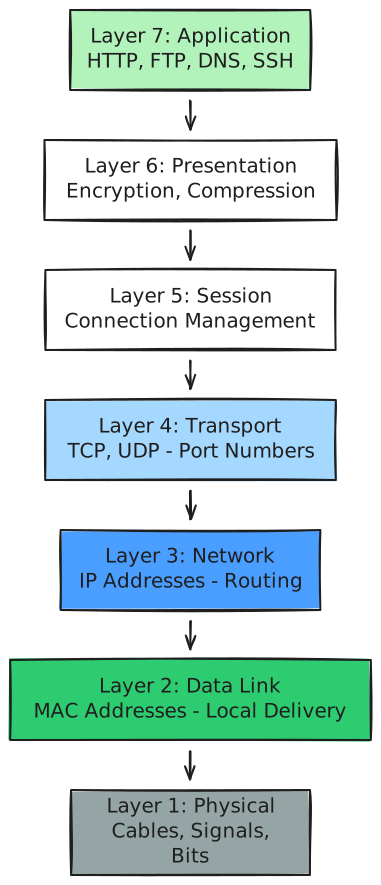
To understand why we have two addressing systems, you need to know about the OSI (Open Systems Interconnection) model - a framework that divides network communication into 7 layers:
Why layers matter:
- Layer 1 (Physical): The actual wires, radio waves, electrical signals
- Layer 2 (Data Link): MAC addresses, switches, local network delivery
- Layer 3 (Network): IP addresses, routers, internet-wide routing
- Layer 4 (Transport): TCP/UDP, port numbers (like 80 for HTTP, 443 for HTTPS)
- Layers 5-7: Applications, encryption, user-facing protocols
Each layer has a specific job. Layer 2 (MAC) handles local delivery within a single network segment. Layer 3 (IP) handles routing between different networks. This separation of concerns makes the internet scalable.
Think of it like mail delivery:
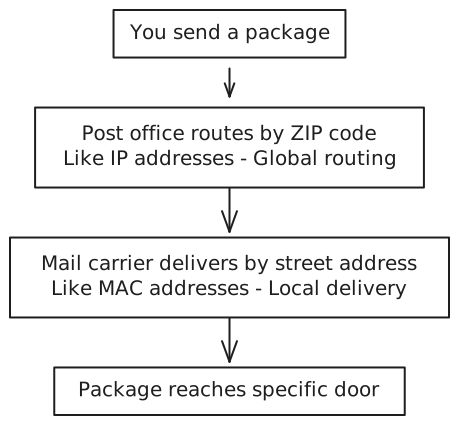
Plain English: IP addresses get data to the right neighborhood (network), MAC addresses deliver it to the right house (device) within that neighborhood.
MAC Addresses: The Hardware Identity🔗
A MAC address (Media Access Control address) is a unique identifier burned into your network card (NIC - Network Interface Card) at the factory.
What It Looks Like🔗
00:1A:2B:3C:4D:5E Or sometimes: 00-1A-2B-3C-4D-5E
That’s 48 bits (6 bytes) written as 12 hexadecimal digits, usually separated by colons or hyphens.
Structure Breakdown🔗
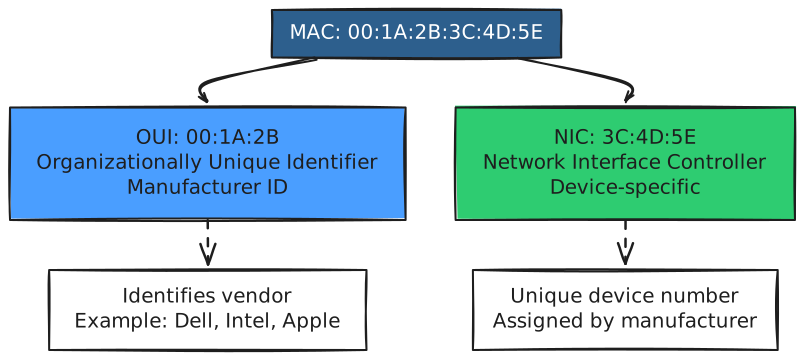
First 3 bytes (OUI): Identify the manufacturer
00:1A:2BA4:C3:F0- Each manufacturer gets unique prefixes from IEEE
Last 3 bytes: Unique device identifier assigned by the manufacturer
Key Characteristics🔗
- Permanent: Burned into hardware (though software can spoof it)
- Unique: Theoretically unique worldwide (2^48 = 281 trillion possible addresses)
- Local scope: Only matters within the same network segment
- Layer 2: Used by switches and bridges
- No hierarchy: Can’t be used for routing decisions
IP Addresses: The Logical Identity🔗
An IP address is a logical address assigned by software (or DHCP) that enables routing across networks.
What It Looks Like (IPv4)🔗
192.168.1.100 - That’s 32 bits (4 bytes) written as four decimal numbers (0-255) separated by dots.
Want to dive deeper into IP addresses? Check out my detailed guide: IP Addresses: The Internet’s Addressing System
Key Characteristics🔗
- Changeable: Can change when you move networks or reconnect
- Hierarchical: Designed for routing (network + host portions)
- Global scope: Can route across the entire internet
- Layer 3: Used by routers
- Location-aware: IP addresses indicate which network you’re on
Why Both? The Complete Picture🔗
Here’s why networks need both addressing systems:
MAC Addresses: Local Delivery🔗
Switches use MAC addresses to forward frames within a local network (LAN). They maintain a MAC address table mapping ports to MAC addresses.
When data arrives at a switch:
1. Look at destination MAC address
2. Check MAC table
3. Forward out the correct port
Switches don’t care about IP addresses. They only understand MAC addresses.
IP Addresses: Global Routing🔗
Routers use IP addresses to forward packets between different networks. They maintain routing tables with network prefixes.
When data arrives at a router:
1. Look at destination IP address
2. Check routing table
3. Forward to the next hop router
Routers strip off the Layer 2 MAC frame, read the Layer 3 IP packet, and create a new MAC frame for the next segment.
Important insight about routers and broadcast domains: This is why a router’s interfaces have different MAC addresses - each interface is in a separate broadcast domain. A broadcast domain is a network segment where broadcast traffic (like ARP requests) is contained. Routers don’t forward broadcasts, which prevents network congestion and segments your network logically.
The Complete Journey🔗

Critical insight:
- IP addresses remain constant throughout the journey (source and destination IPs)
- MAC addresses change at every router hop (each network segment has different MAC addresses)
ARP: The Glue Between MAC and IP🔗
How does a device know the MAC address for a given IP? ARP (Address Resolution Protocol).
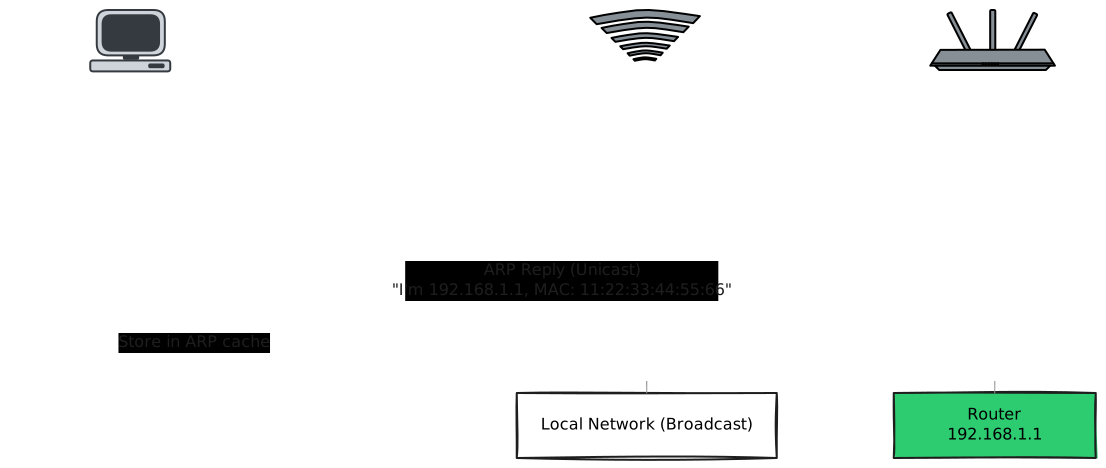
When your computer wants to send data to 192.168.1.1 (your router), it:
- Checks its ARP cache: “Do I already know the MAC for 192.168.1.1?”
- If not, broadcasts an ARP request: “Who has IP 192.168.1.1? Tell me your MAC!”
- The router responds: “I have 192.168.1.1, my MAC is
11:22:33:44:55:66” - Your computer caches this mapping
- Now it can create a frame with the correct destination MAC
View your ARP cache:
# Linux/macOS
arp -a

# Windows
arp -a
You’ll see entries like:
192.168.1.1       11:22:33:44:55:66   ether
192.168.1.50      AA:BB:CC:DD:EE:11   ether
Comparison Table🔗
| Aspect | MAC Address | IP Address |
|---|---|---|
| Full Name | Media Access Control | Internet Protocol |
| Layer | Layer 2 (Data Link) | Layer 3 (Network) |
| Size | 48 bits (6 bytes) | 32 bits IPv4, 128 bits IPv6 |
| Format | Hexadecimal: 00:1A:2B:3C:4D:5E | Decimal: 192.168.1.100 |
| Assigned By | Hardware manufacturer | DHCP or manual configuration |
| Persistence | Permanent (hardware-based) | Temporary (can change) |
| Scope | Local network segment only | Can route globally |
| Used By | Switches, bridges | Routers |
| Purpose | Local delivery within LAN | Routing between networks |
| Uniqueness | Globally unique (in theory) | Unique within network context |
| Hierarchy | None (flat addressing) | Hierarchical (network + host) |
| Changes? | No (unless spoofed) | Yes (when moving networks) |
Practical Implications🔗
Why DHCP Reservations Use MAC Addresses🔗
When you configure a DHCP reservation (ensuring a device always gets the same IP), you specify its MAC address:
MAC: AA:BB:CC:DD:EE:FF → Always assign IP: 192.168.1.50
Why? Because MAC addresses don’t change when you reconnect. If DHCP used IP addresses, it would be circular logic.
Why Routers Use IP, Switches Use MAC🔗
- Switches operate at Layer 2, forwarding frames based on destination MAC addresses within a single network
- Routers operate at Layer 3, forwarding packets based on destination IP addresses between different networks
Network Security: MAC Filtering🔗
Some routers allow “MAC address filtering” - only devices with approved MAC addresses can connect.
Security note: This provides minimal security since MAC addresses can be spoofed in software. It’s security through obscurity, not true protection.
Virtual Machines and Containers🔗
Each VM or container gets:
- Its own MAC address (virtual NIC)
- Its own IP address (assigned by virtual network)
This is how your laptop can run Docker containers with separate network identities.
Common Misconceptions🔗
“MAC addresses are more secure than IP addresses”🔗
Not really. While MAC addresses are hardware-based, they can be changed (spoofed) in software. They’re not authentication credentials.
“All devices on the internet have unique MAC addresses”🔗
Wrong scope. MAC addresses only matter locally. Your device’s MAC never leaves your local network. When packets are routed, the MAC addresses change at each hop, but IP addresses remain.
“I can reach any device if I know its MAC address”🔗
Nope. MAC addresses aren’t routable. You can only reach devices on the same Layer 2 segment. To communicate across networks, you need IP addresses and routing.
“Changing my MAC address makes me anonymous”🔗
Partially true, but limited. Changing your MAC (spoofing) can help with local network privacy (like avoiding wifi tracking), but it doesn’t hide your IP address on the internet.
Try This Yourself🔗
Find Your MAC Address🔗
Linux/macOS:
ip link show
# or
ifconfig

# Look for "link/ether" or "ether"
# Example: ether aa:bb:cc:dd:ee:ff
Windows:
ipconfig /all

# Look for "Physical Address"
# Example: Physical Address. . . . . . . . . : AA-BB-CC-DD-EE-FF
Check Your ARP Cache🔗
See what MAC-to-IP mappings your computer knows:
# Linux/macOS/Windows
arp -a

# You'll see entries like:
# 192.168.1.1 (11:22:33:44:55:66) on en0
Test ARP🔗
Clear your ARP cache and watch it rebuild:
Linux:
# Clear cache (requires sudo)
sudo ip neigh flush all

# Ping your router
ping -c 1 192.168.1.1

# Check cache again
arp -a
Windows:
# Clear cache (requires admin)
arp -d *

# Ping your router
ping 192.168.1.1

# Check cache
arp -a
You’ll see the ARP entry appear after the ping.
Look Up MAC Vendor🔗
Find out who manufactured your network card:
# Your MAC address first 3 bytes
# Example: AA:BB:CC

# Look it up at: https://www.wireshark.org/tools/oui-lookup.html
# Or use: https://macvendors.com
Where You’ll See This in Real Life🔗
In production systems,:
- DHCP configuration: Reserving IPs by MAC address
- Network troubleshooting: “Can you ping the IP? What’s the MAC in your ARP cache?”
- Switch configuration: Managing MAC address tables for port security
- Virtual environments: Assigning unique MAC addresses to VMs
- Container networks: Docker assigns both MAC and IP to containers
- Monitoring tools: Tracking devices by MAC to identify hardware, by IP to track location on the network
- Network access control (NAC): Systems that use MAC + IP for device authentication
Key Takeaways🔗
- Two layers, two addresses: MAC (Layer 2, local) + IP (Layer 3, routable)
- MAC = hardware identity: Permanent, flat, local scope
- IP = logical identity: Changeable, hierarchical, global scope
- Both are necessary: MACs for local delivery, IPs for routing
- ARP bridges the gap: Maps IP addresses to MAC addresses
- Scope matters: MAC addresses only matter on your local network; IP addresses work globally
- Different devices use each: Switches use MAC, routers use IP
- IP stays constant across hops: MAC addresses change at every router
The mental model: Think of MAC as a delivery truck’s license plate (permanent hardware ID) and IP as the delivery address (changes with each destination). Both are needed: the license plate identifies the specific truck, the address guides navigation. Similarly, MAC identifies the physical network card, IP guides routing across networks.
Networks use this layered approach because it separates concerns: Layer 2 handles local delivery efficiently, Layer 3 handles global routing intelligently. This separation is what makes the internet scalable and flexible.