
When I first encountered subnet masks, they looked like random numbers: 255.255.255.0. I had no idea why they existed or what those 255s meant.
Here’s the truth: without understanding subnet masks, you can’t properly:
- Set up a network (home or enterprise)
- Troubleshoot connectivity issues
- Understand why devices can’t talk to each other
- Configure routers, VPNs, or cloud networks
- Work with Docker, Kubernetes, or any containerized system
Subnet masks are the invisible boundary markers that determine which devices are on the same network and which need a router to communicate. Master this, and networking suddenly makes sense.
What Problem Does This Solve?🔗
Imagine you’re managing a massive apartment complex with 10,000 units. You could treat it as one giant building, but that would be chaos. Instead, you divide it into smaller buildings (A, B, C…), with floors, and apartments on each floor.
This hierarchy makes management possible:
- Building staff handle their building only
- Mail gets sorted by building first
- Emergencies are contained to sections
- Resources are distributed efficiently
Early computer networks faced the exact same problem. If you gave someone a Class A network (16 million addresses), they’d have a nightmare:
- All broadcast traffic would flood 16 million devices
- No logical organization
- Terrible performance
- Impossible to manage
Subnetting solves this by dividing large networks into smaller, manageable sub-networks. And subnet masks are the tool that defines these boundaries.
Core Concept: Subnet Masks as Network Boundaries🔗
Think of a subnet mask as a stencil laid over an IP address. It reveals which part is the network and which part is the host.
Okay lets use this analogy: if an IP address is a full street address, the subnet mask is the highlighter that shows you which part is the city (network) and which part is the house number (host).
A typical subnet mask looks like: 255.255.255.0
Applied to an IP address like 192.168.1.100, it tells us:
- Network portion:
192.168.1(the neighborhood) - Host portion:
100(the house)

Plain English: The subnet mask defines where the network ends and individual device addressing begins.
The Binary Truth: How Masks Actually Work🔗
Here’s where subnet masks finally make sense. Remember, computers see everything in binary.
Let’s break down 255.255.255.0:
Decimal:  255      .  255      .  255      .  0
Binary:   11111111 .  11111111 .  11111111 .  00000000
See the pattern? Where the mask has 1s, that’s the network portion. Where it has 0s, that’s the host portion.
Now let’s apply this mask to an IP address:
IP Address:     192.168.1.100
Binary IP:      11000000.10101000.00000001.01100100

Subnet Mask:    255.255.255.0
Binary Mask:    11111111.11111111.11111111.00000000
                ↓         ↓         ↓         ↓
                Network   Network   Network   Host
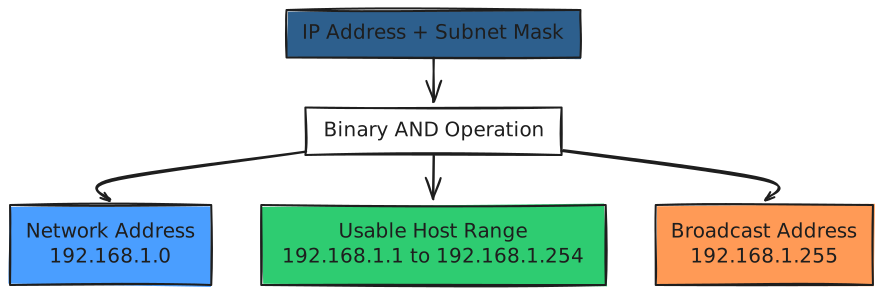
The router uses a binary AND operation:
IP:             11000000.10101000.00000001.01100100
Mask:           11111111.11111111.11111111.00000000
----------------------------------------------------- AND
Network ID:     11000000.10101000.00000001.00000000
                = 192.168.1.0
The network ID is 192.168.1.0 - this identifies the network itself.
Common Subnet Masks and What They Mean🔗
Let’s look at the most common masks you’ll encounter:
255.255.255.0 (/24)🔗
Binary:    11111111.11111111.11111111.00000000
Network:   First 3 octets (24 bits)
Hosts:     Last octet (8 bits) = 2^8 - 2 = 254 usable addresses
Why -2? Two addresses are reserved:
- Network address (all host bits 0):
192.168.1.0 - Broadcast address (all host bits 1):
192.168.1.255
This is the most common home/small office network size.
255.255.255.128 (/25)🔗
Binary:    11111111.11111111.11111111.10000000
Network:   First 25 bits
Hosts:     Last 7 bits = 2^7 - 2 = 126 usable addresses
This splits a /24 network into two /25 networks:
192.168.1.0/25(hosts: 1-126)192.168.1.128/25(hosts: 129-254)
255.255.0.0 (/16)🔗
Binary:    11111111.11111111.00000000.00000000
Network:   First 2 octets (16 bits)
Hosts:     Last 2 octets (16 bits) = 2^16 - 2 = 65,534 usable addresses
This is what Class B networks used by default. Large organizations use this for big campus networks.
255.0.0.0 (/8)🔗
Binary:    11111111.00000000.00000000.00000000
Network:   First octet (8 bits)
Hosts:     Last 3 octets (24 bits) = 2^24 - 2 = 16,777,214 usable addresses
This is what Class A networks used. Only massive organizations have these.
CIDR Notation: The Modern Way🔗
Instead of writing 255.255.255.0, network engineers use CIDR (Classless Inter-Domain Routing) notation:
192.168.1.0/24
The /24 means “the first 24 bits are the network portion.”

Here’s a quick reference:
| CIDR | Subnet Mask | Usable Hosts | Common Use |
|---|---|---|---|
| /32 | 255.255.255.255 | 1 | Single host |
| /30 | 255.255.255.252 | 2 | Point-to-point links |
| /29 | 255.255.255.248 | 6 | Very small network |
| /28 | 255.255.255.240 | 14 | Small office |
| /27 | 255.255.255.224 | 30 | Department |
| /26 | 255.255.255.192 | 62 | Small business |
| /25 | 255.255.255.128 | 126 | Half of /24 |
| /24 | 255.255.255.0 | 254 | Standard network |
| /23 | 255.255.254.0 | 510 | Two /24s |
| /22 | 255.255.252.0 | 1,022 | Four /24s |
| /21 | 255.255.248.0 | 2,046 | Eight /24s |
| /20 | 255.255.240.0 | 4,094 | Sixteen /24s |
| /16 | 255.255.0.0 | 65,534 | Large network |
| /8 | 255.0.0.0 | 16,777,214 | Huge network |
Why Subnetting Exists: The Real-World Benefits🔗
1. Reduce Broadcast Traffic🔗
Without subnetting, every broadcast (like ARP requests) floods the entire network. In a network with 10,000 devices, that’s chaos.
With subnetting, broadcasts only reach devices in the same subnet.
2. Security Segmentation🔗
You can isolate different parts of your network:
- Web servers in
10.0.1.0/24 - Database servers in
10.0.2.0/24 - Employee workstations in
10.0.3.0/24
Firewall rules between subnets control traffic flow.
3. Efficient Address Allocation🔗
Instead of wasting a Class B (65,000 addresses) on a department with 50 people, you give them a /26 (62 addresses).
4. Organizational Clarity🔗

Calculating Subnet Boundaries🔗
Let’s say you have 192.168.10.45/28. How do you find:
- The network address?
- The broadcast address?
- The usable host range?
Step 1: Convert /28 to a subnet mask🔗
/28 means 28 network bits:
11111111.11111111.11111111.11110000 = 255.255.255.240
Step 2: Identify the “interesting octet”🔗
The last octet (240) is where the magic happens. The others are all 255 (or 0).
Step 3: Find the block size🔗
256 - 240 = 16
So networks increment in blocks of 16:
192.168.10.0/28(0-15)192.168.10.16/28(16-31)192.168.10.32/28(32-47) ← Our IP (45) is here!192.168.10.48/28(48-63)
Step 4: Determine addresses🔗
For 192.168.10.32/28:
- Network address:
192.168.10.32 - First usable:
192.168.10.33 - Last usable:
192.168.10.46 - Broadcast:
192.168.10.47
VLSM: Variable Length Subnet Masking🔗
Modern networks use VLSM - different subnet masks for different needs.
Imagine you need:
- 100 hosts for engineering
- 50 hosts for sales
- 10 hosts for management
Instead of giving everyone a /24 (254 hosts), you use:
- Engineering:
10.0.1.0/25(126 hosts) - Sales:
10.0.2.0/26(62 hosts) - Management:
10.0.3.0/28(14 hosts)
This conserves IP space and improves efficiency.
Common Misconceptions🔗
“All devices on a network must have the same IP structure”🔗
Not true. They need the same network portion, but the host portion differs. In 192.168.1.0/24, devices can be 192.168.1.1, 192.168.1.45, 192.168.1.200, etc.
“255.255.255.0 is the only valid mask”🔗
Wrong. Any bit pattern where 1s are contiguous from the left is valid: 11111111.11111111.11111000.00000000 (/21) works fine.
Try This Yourself🔗
Find your network information:
On Linux/macOS:
ip addr show
# or
ifconfig

# Look for something like:
# inet 192.168.1.100/24
On Windows:
ipconfig

# Look for:
# IPv4 Address: 192.168.1.100
# Subnet Mask: 255.255.255.0
Calculate your network:
If you have 192.168.1.100/24:
- Network:
192.168.1.0 - Broadcast:
192.168.1.255 - Usable range:
192.168.1.1to192.168.1.254 - Total devices on your network: 254 max
Test connectivity within your subnet:
# Ping another device on your network
ping 192.168.1.1  # Usually your router

# Try to discover all devices (Linux)
nmap -sn 192.168.1.0/24
Where You’ll See This in Production🔗
In real systems:
- VPCs: You create VPCs with CIDR blocks like
10.0.0.0/16, then subnet them into smaller pieces - Kubernetes: Pod networks use subnetting (e.g.,
10.244.0.0/16divided per node) - Docker: Each Docker network gets a subnet (default:
172.17.0.0/16) - Office networks: Different floors or departments get different subnets
- Cloud firewalls: Rules like “Allow traffic from
10.0.1.0/24”
Key Takeaways🔗
- Subnet masks define network boundaries - they split IP addresses into network and host portions
- Binary is the reality: Masks are contiguous 1s (network) followed by 0s (hosts)
- CIDR is standard:
/24is cleaner than writing255.255.255.0 - Subnetting = division: Breaking large networks into manageable pieces
- Reserved addresses: Network address (all 0s) and broadcast (all 1s) can’t be assigned to hosts
- Formula: Hosts = 2^(host bits) - 2
- Think hierarchically: Like dividing a city into neighborhoods, streets, and houses
The mental model: A subnet mask is a binary stencil that reveals which part of an IP address identifies the network and which identifies individual devices. It’s the boundary that determines “us vs. them” in networking - devices in the same subnet can talk directly; different subnets need a router.